
Enterprise customers – particularly in public sector, finance, healthcare, and critical infrastructure – increasingly face regulatory or governance requirements demanding documented vendor contingency strategies. This is not about distrust of Cloudflare’s resilience; it’s about demonstrating due diligence and risk management to auditors, boards, and compliance bodies.
TL;DR: Cloudflare’s native resilience (anycast, Load Balancing, health checks) handles most availability needs – fallback systems only make sense for compliance-level guarantees. Bypassing Cloudflare via DNS is possible but removes WAF / DDoS protection and exposes origin servers. If contingency is required, use Active-Active (Primary-Primary) DNS with both Cloudflare and an external provider in NS records – traditional read-only Secondary DNS cannot modify records during outages. Additional requirements: publicly trusted TLS certificates, origin firewalls, Infrastructure as Code, and tested runbooks. Platform providers serving many customers need API-first automation; those with heavy edge logic (Workers / KV / DO) may find bypass doesn’t restore functionality. For most organizations, the security risk and operational complexity of bypass outweigh the rare benefit of avoiding brief outages — waiting for restoration is usually the safer choice.
When Contingency Planning Actually Matters#
Regulatory Drivers#
- Financial Services: Central Banks or Governments usually mandate operational resilience frameworks with vendor concentration risk assessments.
- Public Sector: often reference sovereignty controls, documented exit capabilities.
- Critical Infrastructure: Network and Information Security Directive 2.0 (NIS2) mentions having robust redundancy measures in place for critical systems.
- Healthcare: US HIPAA business associate agreements and other data residency requirements usually drive contingency planning for protected health information (PHI) systems.
Reality Check#
Despite these drivers, security / operational cost of parallel infrastructure often exceeds vendor dependency risk. Most organizations are better served by:
- Maximizing Cloudflare’s native resilience features.
- Maintaining strong Cloudflare Enterprise account team or Partner relationships.
- Accepting brief degradation preferable to exposing unprotected origins.
- Investing in origin resilience and disaster recovery.
Cloudflare’s Standard Architecture Is Already Resilient#
Cloudflare separates its Control Plane (management / API / Dashboard) from its Data Plane (traffic flow / Edge), ensuring traffic continues to flow even if the management dashboard is unavailable. Cloudflare’s global anycast network is architected for resilience – every server in every data center shares the same tech stack and announces IP addresses via anycast, providing inherent redundancy.
Before discussing contingency strategies, recognize that a properly configured Cloudflare deployment already provides exceptional resilience:
Anycast routing: Traffic automatically routes to the nearest healthy data center.
N+x redundancy: Multiple servers (Multi-Colo-PoPs) in each location provide failover without manual intervention.
Control / Data Plane separation: Existing configurations continue operating even during control plane degradation.
Load Balancing with health checks: Automatic origin failover within Cloudflare.
Serverless Runtime Workers for custom failover logic: Write programmable traffic routing based on origin health, retries, timeouts, and circuit breakers for dependencies for storage options.
Geographic distribution and backbone: 13,000+ network interconnects with major ISPs and cloud providers.
Most availability requirements are met through proper Cloudflare configuration – using Load Balancing, health checks, traffic steering, and multiple origins – rather than multi-vendor complexity.
While Cloudflare strives for maximum resilience – constantly improving through learning and innovation – some customers require documented contingency (“break glass”) strategies to meet risk compliance, regulatory, or sovereignty requirements. This document provides a non-exhaustive high-level introduction to architectural patterns for designing failover capabilities while maintaining security posture.
The goal is not to offboard from Cloudflare, but to provide a potential safety net (backup plan) that allows customers to rely on the platform with confidence.
Critical Self-Risk Assessment#
Before activating any bypass strategy or failover plan, organizations must answer:
At what point does the security risk of exposing infrastructure outweigh the downtime of waiting for service restoration?
Considerations:
- Loss of WAF / DDoS protection: Disabling Cloudflare exposes origin IPs directly to the Internet.
- Integration breakage: Third-party scripts and integrations, Workers, Load Balancing logic, and SaaS integrations may fail – if they are also using Cloudflare.
- Attack surface exposure: Malicious actors monitor DNS changes; bypassing protections during outages creates potential exploitation windows.
- Operational cost: Maintaining parallel infrastructure, training staff on multiple platforms, and designing applications for vendor-agnostic operation requires significant investment, time and additional resources.
- Configuration drift: Multi-vendor setups introduce complexity in maintaining policy parity, certificate management, and configuration coordination.
For most organizations, the answer is: wait for service restoration. The cost of maintaining bypass / a backup infrastructure, the security risk of exposure, and the complexity of multi-vendor operations exceeds the cost of brief service degradation.
Before implementing multi-vendor strategies, exhaust Cloudflare’s native resilience capabilities.
Part 1: Application Services (Reverse Proxy / CDN / WAF)#
The primary mechanism for circumventing Cloudflare reverse proxy for application traffic relies on DNS architecture and origin security.
Diagram: Emergency Bypass Flow#
┌────────────────────────────────────────────────────────────────────┐
│                        DNS RESOLUTION LAYER                        │
├────────────────────────────────────────────────────────────────────┤
│                                                                    │
│    User ──► DNS Query ──► Authoritative DNS                        │
│                               │                                    │
│              ┌────────────────┴────────────────┐                   │
│              ▼                                 ▼                   │
│    ┌─────────────────────┐          ┌─────────────────────┐        │
│    │   PATH A: STANDARD  │          │  PATH B: EMERGENCY  │        │
│    │   (Recommended)     │          │  (Contingency)      │        │
│    └─────────┬───────────┘          └─────────┬───────────┘        │
│              ▼                                 ▼                   │
│    Cloudflare Anycast IPs           Backup Provider IP             │
│              │                      OR Direct Origin IP            │
│              ▼                                 │                   │
│    ┌─────────────────────┐                     │                   │
│    │  Cloudflare Edge    │                     │                   │
│    │  • DDoS Protection  │                     │                   │
│    │  • Bot Management   │                     │                   │
│    │  • WAF              │                     │                   │
│    │  • Rate Limiting    │                     │                   │
│    │  • CDN/Cache        │                     │                   │
│    └─────────┬───────────┘                     │                   │
│              │                                 │                   │
│              └────────────┬────────────────────┘                   │
│                           ▼                                        │
│                    Origin Server(s)                                │
│                    (Must have publicly trusted TLS certs)          │
│                                                                    │
└────────────────────────────────────────────────────────────────────┘

DECISION POINT: Switch occurs at the Authoritative DNS layer
Architecture Components & Failover Steps#
| Component | Resiliency Strategy | Failure Scenario Action (“Break glass”) |
|---|---|---|
| Management | Infrastructure as Code (IaC): Manage configurations via API / Terraform instead of Dashboard UI. Use CI/CD pipelines. | If Dashboard (Control Plane) is unavailable, API often remains operational. Use pipelines to rollback or push bypass configs. |
| Domain Registrar | Decoupled Registrar: Keep Domain Registrar separate from Cloudflare. | Ultimate control point. Ensures capability to change Nameserver (NS) records even if Cloudflare is entirely unreachable. |
| DNS (CNAME Setup) | Use external Authoritative DNS (Route53, Azure DNS) and CNAME specific subdomains to Cloudflare. Take into account DNSSEC. | Remove CNAME record pointing to cdn.cloudflare.net and replace with A/CNAME record pointing to origin or backup provider. |
| DNS (Full Setup) | Configure Secondary DNS provider with zone transfers. Take into account DNSSEC. | If Cloudflare nameservers are unresponsive, secondary provider answers queries. Requires zone synchronization. |
| Origin Security | Publicly Trusted Certificates: Ensure origins have valid, publicly trusted SSL/TLS certificates (not Cloudflare-issued Certificates only). | Critical: If disabling Cloudflare, origin (or backup provider) must terminate TLS directly without certificate errors. Using a Custom Certificate can be advantageous in this case. |
| Load Balancing | Configure Cloudflare Load Balancing with health checks, multiple origins, and traffic steering. | Primary resilience mechanism: Cloudflare automatically fails over to healthy origins with adaptive routing. Configure appropriate health check intervals and origin pools. |
| CDN/Proxy | Multi-vendor architecture (Primary-Fallback or Active-Active) for those who can afford operational complexity. | Route traffic to backup CDN / security provider via DNS steering. Note: Introduces configuration drift, cache management complexity, and certificate coordination overhead. |
DNS Setup Options#
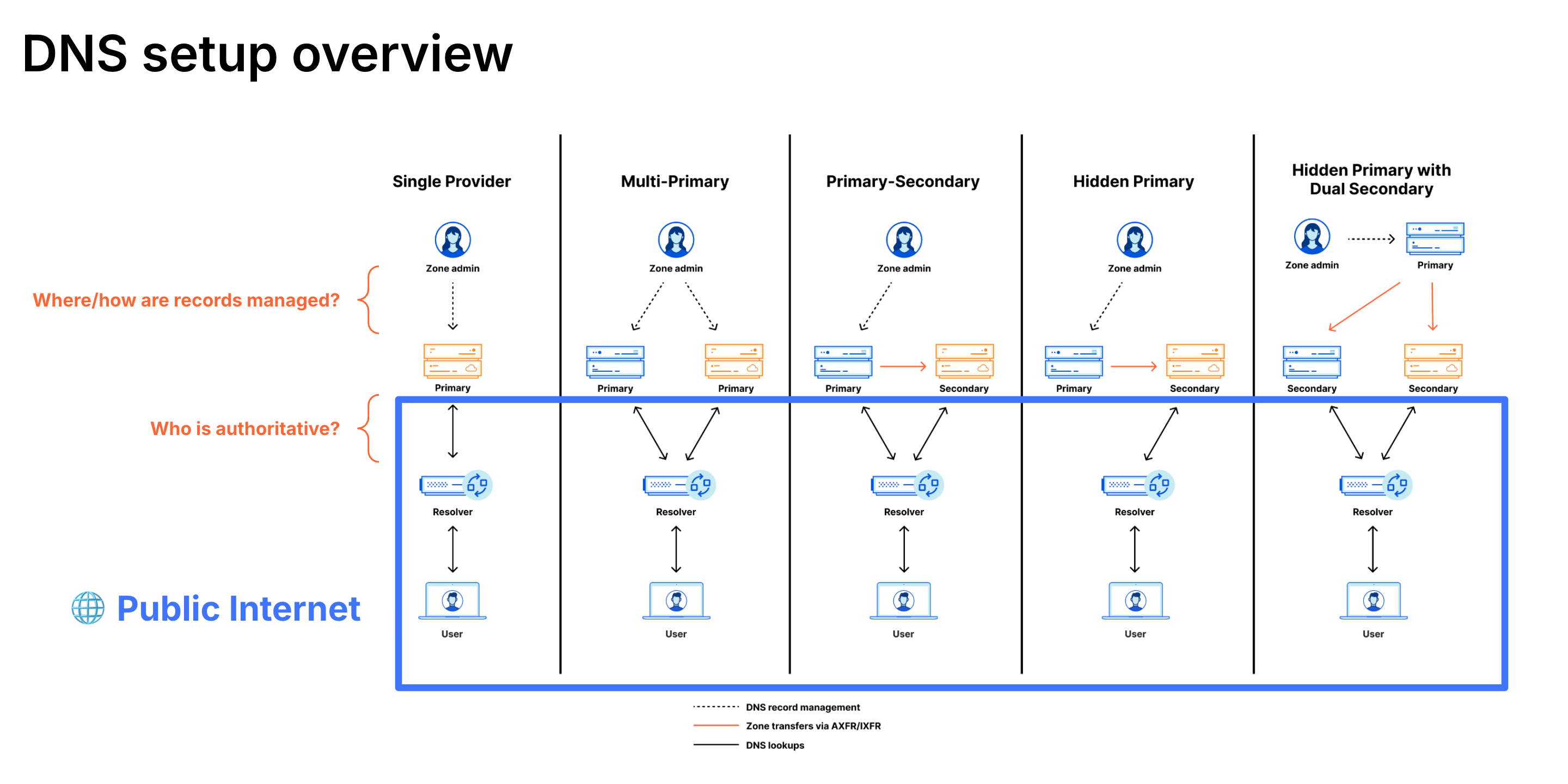
| DNS Setup | Failover Speed | Write Access During Outage | Best For | Trade-offs |
|---|---|---|---|---|
| Active-Active (Primary-Primary) | Fastest (seconds) | ✅ Yes - modify at either provider | Organizations requiring true contingency capability | • Bidirectional zone sync complexity (NOTIFY / AXFR) • Both providers in NS records • DNSSEC coordination required • Higher cost |
| CNAME (Partial) | Fast (seconds-minutes) | ✅ Yes - control external DNS | Organizations wanting fastest failover with minimal setup | • Requires external Auth DNS • Per-subdomain proxy management |
| Traditional Secondary (Cloudflare as Primary) | Fast (minutes) for queries | ❌ No - cannot modify records | Organizations wanting DNS query redundancy only | Not recommended for contingency - if Cloudflare is primary and unavailable, cannot modify records at read-only secondary |
| Cloudflare as Secondary | Fast (minutes) | ✅ Yes - modify at primary provider | Organizations wanting write access with simpler setup than Active-Active | • Cloudflare receives zone transfers (read-only) • Modify records at external primary provider • Changes sync to Cloudflare • Can use Secondary DNS Override to proxy specific records • Simpler than Active-Active |
| Full Setup (Cloudflare Only) | Slowest (hours to days) | ❌ No - requires NS change at registrar | Maximum Cloudflare features; accept degradation risk | • NS change usually requires several hours for propagation • Exposes origin IPs when unproxied • Accept wait time vs. exposure |
Take into account DNS TTL.
Understanding Zone Transfer Directions#
| Setup | Primary (Read-Write) | Secondary (Read-Only) | Zone Transfer Direction | Who Can Modify Records During Outage? |
|---|---|---|---|---|
| Cloudflare as Primary | Cloudflare | External provider | Cloudflare → External | ❌ If Cloudflare down, cannot modify |
| Cloudflare as Secondary | External provider | Cloudflare | External → Cloudflare | ✅ Modify at external primary |
| Active-Active (Primary-Primary) | Both | Both | Bidirectional | ✅ Modify at either provider |
Critical Distinction: “Secondary DNS” traditionally means read-only zone transfers. For contingency planning, you need write access to modify DNS records during an outage. This requires either:
- Active-Active (Primary-Primary) configuration with bidirectional sync, OR
- Cloudflare as Secondary DNS, OR
- CNAME setup where you control the external authoritative DNS
Multi-Vendor Architecture Options#
For organizations with resources to maintain parallel infrastructure:
┌──────────────────────────────────────────────────────────────────────┐
│                    MULTI-VENDOR DNS LOAD BALANCING                   │
├──────────────────────────────────────────────────────────────────────┤
│                                                                      │
│                      External DNS Provider                           │
│                      (Route53 / Azure DNS)                           │
│                             │                                        │
│            ┌────────────────┴────────────────┐                       │
│            ▼                                 ▼                       │
│   ┌─────────────────┐               ┌─────────────────┐              │
│   │   Cloudflare    │               │  Backup Vendor  │              │
│   │   (Primary)     │               │  (Fallback)     │              │
│   │                 │               │                 │              │
│   │  Full feature   │               │  Baseline       │              │
│   │  set enabled    │               │  protection     │              │
│   └────────┬────────┘               └────────┬────────┘              │
│            │                                 │                       │
│            └────────────┬────────────────────┘                       │
│                         ▼                                            │
│                   Origin Server(s)                                   │
│                                                                      │
│   Traffic Distribution: Health-check based, performance-based,       │
│                         or weighted round-robin                      │
│                                                                      │
└──────────────────────────────────────────────────────────────────────┘
Configuration Management: Maintain parity via Terraform across providers. API-first approach enables automated synchronization.
- Active-Active (Recommended): Both vendors receive traffic continuously. Provides ongoing signal for security tools (i.e. Bot Management, Rate Limiting). Configuration complexity manageable if traffic split is maintained.
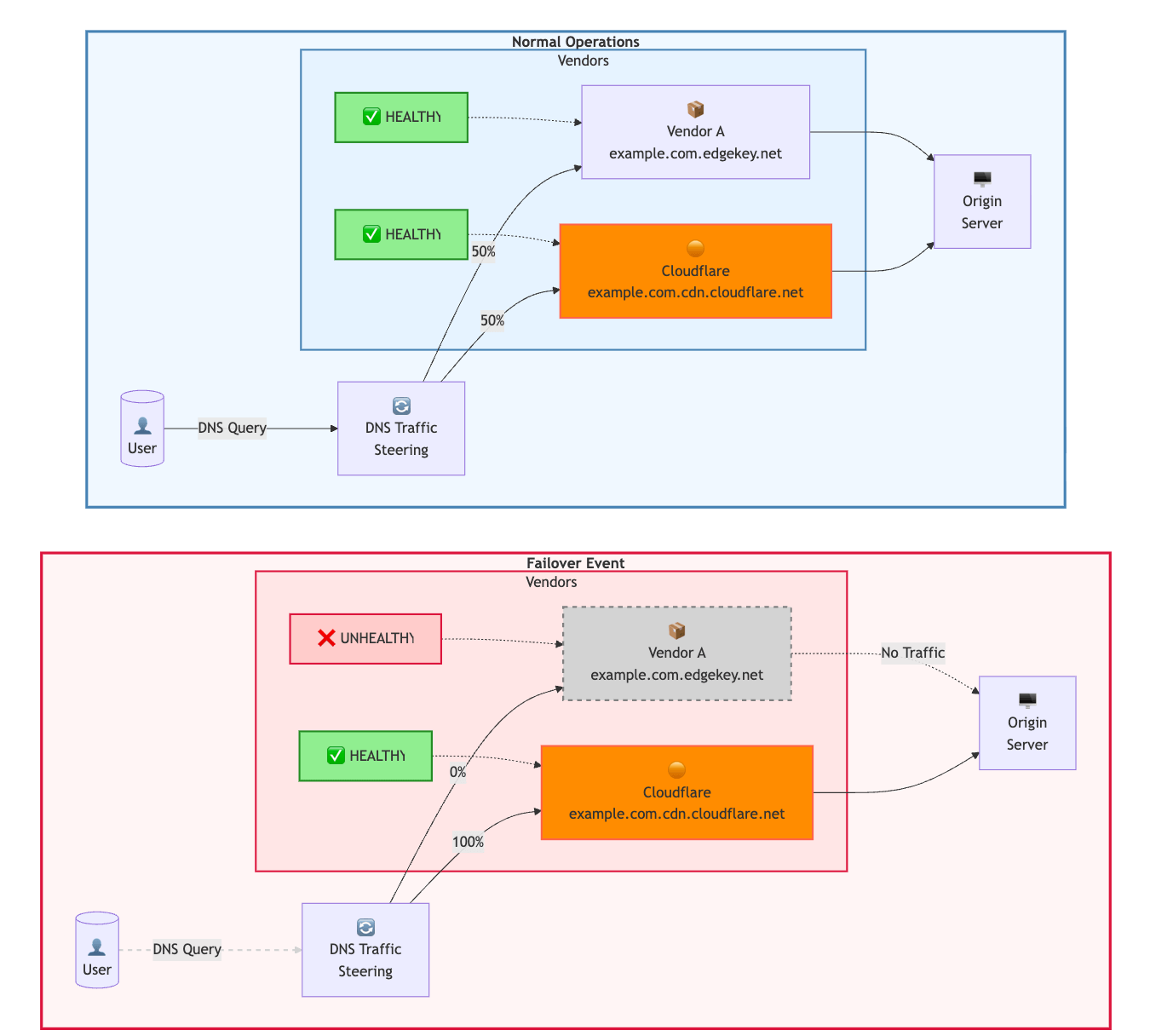
- Active-Passive: One vendor receives all traffic normally; backup only used during incidents. Higher cutover risk due to cold configuration and lack of baseline traffic for Machine Learning (ML)-based security features.
Operational Considerations:
- Cache purge and security coordination across vendors required.
- Certificate management complexity (same Custom Certificates on both platforms).
- Log aggregation and normalization to common SIEM format.
- Configuration drift monitoring and automated reconciliation.
- Only really justified for extreme availability requirements or regulatory mandates.
Part 2: SASE (Zero Trust) & Network Services#
For Zero Trust (WARP Device Client / Secure Web Gateway) and Network services (Magic Transit), contingency planning can be more complex as these services are deeply integrated into employee workflows and network infrastructure.
- “Shadow VPN” Strategy: Pre-deployed but dormant legacy VPN infrastructure (OpenVPN, etc.) that can be activated if Cloudflare Zero Trust becomes unavailable. Requires maintaining separate authentication, DNS, and network routing configurations.
Diagram: SASE Failover Logic#
┌───────────────────────────────────────────────────────────────────────┐
│                     ZERO TRUST FAILOVER DECISION TREE                 │
├───────────────────────────────────────────────────────────────────────┤
│                                                                       │
│                        ┌─────────────────┐                            │
│                        │  WARP Client    │                            │
│                        │  (User Device)  │                            │
│                        └────────┬────────┘                            │
│                                 │                                     │
│                        ┌────────▼────────┐                            │
│                        │ Service Status? │                            │
│                        └────────┬────────┘                            │
│                    ┌────────────┴────────────┐                        │
│                    ▼                         ▼                        │
│           ┌──────────────┐          ┌──────────────┐                  │
│           │    NORMAL    │          │   FAILURE    │                  │
│           └──────┬───────┘          └──────┬───────┘                  │
│                  ▼                         │                          │
│    ┌─────────────────────┐      ┌──────────┴──────────┐               │
│    │   WARP Tunnel       │      ▼                     ▼               │
│    │        │            │  ┌─────────┐        ┌──────────┐           │
│    │        ▼            │  │FAIL OPEN│        │FAIL CLOSE│           │
│    │ Cloudflare Gateway  │  │(Trigger)│        │(Default) │           │
│    │        │            │  └────┬────┘        └────┬─────┘           │
│    │        ▼            │       ▼                  ▼                 │
│    │ Internet / Company  │  Direct Internet     Block All             │
│    │ Applications        │  (No filtering)      Traffic               │
│    └─────────────────────┘  HIGH AVAILABILITY   HIGH SECURITY         │
│                             LOW SECURITY        ZERO AVAILABILITY     │
│                                                                       │
└───────────────────────────────────────────────────────────────────────┘

┌────────────────────────────────────────────────────────────────────────────┐
│                      MAGIC TRANSIT FAILOVER                                │
├────────────────────────────────────────────────────────────────────────────┤
│                                                                            │
│   Normal State:                                                            │
│   Customer IP Prefix ──► Cloudflare BGP Announcement ──► DDoS Scrubbing    │
│                               ──► GRE / IPsec Tunnel ──► Customer Network  │
│                                                                            │
│   Failure State:                                                           │
│   Withdraw BGP from Cloudflare ──► Announce via ISP directly               │
│                                                                            │
│   ⚠ WARNING: Direct ISP announcement removes Cloudflare DDoS protection    │
│                                                                            │
└────────────────────────────────────────────────────────────────────────────┘
Architecture Components & Failover Steps#
| Component | Resiliency Strategy | Failure Scenario Action (“Break glass”) |
|---|---|---|
| Client Agent (WARP) | Mobile Device Management (MDM) Managed Deployment: Deploy WARP via Intune / Jamf to retain control over agent state. Or use the Cloudflare API for configuration changes. | Push MDM command to change mode or trigger fail-open via API or (worst-case remove) WARP. Note: Removes all Zero Trust traffic policies. Fail Open: Users access Internet directly (availability, low security). Fail Close (default behavior): Users blocked until recovery (high security, low availability). |
| Failover Mode | Configure Local Domain Fallback for split-tunnel scenarios. | For critical services, configure fallback domains accessible directly if WARP connectivity fails. |
| Internal Connectivity (Cloudflare Tunnel) | High Availability (HA) Replicas: Deploy multiple cloudflared instances across servers for local redundancy. Additionally, use a fallback connectivity mechanism (other VPN) to allow to connect to the internal resources. | Activate “Shadow VPN” (legacy connector). Users disconnect WARP and connect to dormant legacy VPN (i.e. OpenVPN). Alternatively, via the Public Internet. |
| Authentication (Access) | Token Lifecycle: Adjust session duration (JWT) to balance security vs. resilience and user-experience. | “Shadow VPN” must authenticate directly against the Identity Provider (IdP), circumventing Cloudflare Access during outage. It is also recommended to have a backup IdP. |
| Private DNS | Internal private hostnames resolve via WARP (exposing Private DNS or using Internal DNS). | “Shadow VPN” server must push internal DNS resolvers that resolve to local LAN IPs (RFC1918) instead. |
| Publicly Exposed Apps and SaaS | IP Allowlisting with Dedicated Egress IPs for SaaS apps, and Access authentication for self-hosted apps. | Configure origin firewall to allow traffic from “Shadow VPN” NAT IP or specific Admin IPs. Allow access via direct IP or backup hostname. |
| Magic Transit | BGP Control & Redundancy: GRE / IPsec tunnels to diverse PoPs, maintain backup ISP paths. In addition, consider Network Interconnect (CNI) (peering) for dedicated links. | Withdraw BGP prefixes from Cloudflare. Announce prefixes directly to upstream ISPs. Requires “BGP Zombie” mitigation planning (stale route cleanup). Review RPKI. Magic Transit On-Demand provides pre-configured standby capacity without always-on costs. |
| Private Links | Private Network Interconnect (PNI / CNI): Direct physical links where possible. | Fallback to traditional GRE / IPsec tunnels, VPNs (“Shadow VPN”), or direct MPLS links. |
Practical Sample Action Plan for Cloudflare L7 Application Services#
Context and Scope: This sample action plan assumes the outage affects Cloudflare Layer-7 (HTTP/HTTPS) reverse-proxy / application services. Mitigations differ for other Cloudflare products (Magic Transit, Spectrum, Zero Trust, etc.). The guidance below addresses immediate operational steps, risks, and configuration details for bypassing Cloudflare so traffic reaches origins directly.
Develop and implement a tailored internal action plan and resiliency policies for each vendor you work with.
Immediate Checks (First 60–120 Seconds)#
- Confirm Cloudflare outage via Cloudflare Status and public reports
- Verify Cloudflare API accessibility (API responsiveness required for fast programmatic toggles)
- Identify which DNS records are proxied (orange cloud /
proxied: true) vs DNS-only - Verify origin public accessibility, capacity (CPU, connections, bandwidth, autoscaling status) and security (firewall)
Fastest Mitigation (Not Recommended): Disable the Reverse Proxy (DNS Stays on Cloudflare)#
Action: Set affected DNS records from proxied → DNS only (orange cloud → grey cloud).
Effect: Cloudflare continues serving DNS responses but no longer proxies or terminates TLS/HTTP; clients resolve names to origin IPs directly.
How to Execute:
Via Dashboard:
DNS → Select Record → Toggle Proxy Status → Save
Via API (example for single record):
curl -X PUT "https://api.cloudflare.com/client/v4/zones/{ZONE_ID}/dns_records/{RECORD_ID}" \
  -H "Authorization: Bearer {API_TOKEN}" \
  -H "Content-Type: application/json" \
  --data '{
    "type": "A",
    "name": "www.example.com",
    "content": "198.51.100.4",
    "ttl": 120,
    "comment": "Disabled due to XYZ – write a recognizable comment for auditing",
    "proxied": false
  }'
Post-Change Verification:
- Confirm
proxied: falseviaGET /zones/{zone_id}/dns_recordsordig +shortto ensure responses are origin IPs - Test origin responds to HTTP(S) directly; validate TLS handshake and application behavior
- Monitor origin resource utilization (CPU, memory, connections)
Alternative When Cloudflare API is Unavailable: Change DNS to Point Directly to Origin#
If you operate external DNS (or secondary DNS provider) with CNAME setup:
- Update DNS entries to point to origin host or origin IPs directly
- Replace CNAME target with origin A/AAAA record or CNAME to origin hostname
Considerations:
- If zone is Cloudflare authoritative DNS, switching to another provider requires NS record changes at registrar (not fast during outage – requires pre-planning)
- DNS TTL matters: Long TTLs slow propagation. Use 60–300s TTLs in normal operation for faster failover
- Secondary DNS with zone transfers enables rapid failover if pre-configured
TLS, Certificates and Ports#
When traffic bypasses Cloudflare:
Certificate Requirements:
- Origin must present valid certificate accepted by clients
- Ensure origin has public CA certificate (not Cloudflare Origin CA only)
- Clients will validate certificate directly; mismatched SANs or expired certs cause failures
Protocol Support:
- Verify origin supports SNI, ALPN, HTTP/2 if clients expect these
- Cloudflare supports non-standard ports; ensure origin listens on same ports clients use
Security and Operational Risks When Bypassing Cloudflare#
Immediate Loss of Protections:
- WAF, rate limiting, bot management, DDoS mitigation no longer active
- Origin IPs exposed to scanning and direct attack if previously hidden
- Review and update origin firewall rules, fail2ban configurations, and ACLs
Capacity Concerns:
- Predictable surge in traffic and connections
- Monitor resource usage and enable autoscaling if available
- Consider connection limits at origin
Observability:
- Ensure direct-to-origin logs are collected
- Adjust alerting thresholds for increased baseline traffic
Pre-Incident Preparedness Checklist#
Implement these measures before an outage occurs:
✅ Disaster Runbook: Document exact API calls and operator steps to toggle proxied flags and update DNS records. Keep API tokens secure and accessible.
✅ DNS Resilience:
- Maintain low TTLs (60–300s) for critical records
- Configure tested secondary DNS provider with pre-staged records
✅ Origin TLS:
- Deploy publicly valid TLS certificates with automated renewal
- Keep Cloudflare Origin CA certs only if you also maintain public CA cert for failover
✅ Origin DDoS Protections:
- Implement network ACLs, upstream scrubbing, provider mitigations as fallback
- Use iptables to allowlist only Cloudflare IPs normally, but have rules ready to open during bypass
✅ Health-Check Driven Failover:
- Use DNS provider supporting active/passive failover
- Test failover quarterly / periodically
✅ Multi-CDN Architecture (for extreme requirements):
- Consider active-passive or active-active with traffic steering at DNS or load balancer layer
- Review multi-vendor reference architecture
✅ DNS Architecture (Choose ONE):
Option A - Active-Active (Primary-Primary) (Most robust, higher complexity):
- Configure bidirectional zone synchronization
- Both Cloudflare and external provider in NS records at registrar
- Verify you can modify at either provider and changes sync
- Test emergency DNS modifications at both providers periodically
Option B - Cloudflare as Secondary (Simpler, recommended for most):
- Configure external provider as primary (read-write)
- Set up zone transfers: External → Cloudflare
- Add both providers’ nameservers to NS records at registrar
- Can use Secondary DNS Override to proxy specific records
- Verify you can modify at external primary and changes sync to Cloudflare
- Test emergency DNS modifications at external primary periodically
✅ Registrar Independence:
- Critical: If using Cloudflare Registrar, transfer critical revenue-generating domains to external registrar
- Maintain registrar credentials separately from Cloudflare account
- Store MFA backup codes securely
- Test registrar login and NS change procedures periodically
✅ Edge Logic Assessment:
- Document all application logic implemented in Workers, KV, Durable Objects, R2
- Identify which features will be unavailable during bypass
- For critical features: implement fallback logic at origin OR accept temporary unavailability
- Create feature degradation communication templates for users
- Test application behavior with edge logic disabled
✅ Platform Provider Scale (if serving multiple customers):
- Build API-first automation for bulk DNS/configuration changes
- Pre-provision TLS certificates for critical customers at backup provider
- Implement tiered customer approach (critical vs. standard)
- Create staged rollout procedures
- Test automation on pilot customers periodically
Rollback and Verification After Cloudflare Recovery#
Re-Enable Protections:
- Verify Cloudflare services healthy via Status page and test requests
- Re-enable proxying (
proxied: true) for records previously disabled - Or re-point authoritative DNS back to Cloudflare if NS records were changed
- Re-verify origin security rules to allow Cloudflare
Validation:
- Test TLS termination, WAF rules, bot management features
- Review origin access logs and Cloudflare Logs and Analytics to confirm traffic routing normalized
- Verify security features (rate limiting, firewall rules) are active
Post-Incident Review:
- Document actual time to failover vs. RTO targets
- Identify gaps in security, runbook or tooling
- Update incident response procedures with lessons learned
Summary: Technical Tradeoffs#
| Mitigation Strategy | Speed | Requirements | Risks |
|---|---|---|---|
| Toggle proxy off via API/Dashboard | Fastest (seconds) | Cloudflare API reachable | Removes L7 protections, exposes origins |
| Change DNS to origin | Medium (TTL dependent) | External DNS control | Propagation delay, requires pre-planning, exposes origins |
| Switch authoritative NS | Slowest (likely hours) | Pre-configured secondary DNS | Long propagation, manual registrar changes |
Key Insight: Preparation (low TTLs, secondary DNS, origin certs, autoscaling, origin security controls) reduces impact and decreases time to recovery. The fastest mitigations require the most preparation.
Monitoring & Incident Detection#
Independent monitoring is essential for informed failover decisions.
| Capability | Implementation |
|---|---|
| Status Notifications | Subscribe to Cloudflare Status. Configure webhook / PagerDuty alerts. |
| Logpush | Stream logs (HTTP requests, Firewall, Audit, etc.) with Logpush to SIEM / observability platform for anomaly detection. |
| Internal Monitoring | Monitor origin servers for errors, latency spikes, traffic anomalies, using tools such as Grafana or others. |
| External Monitoring | Third-party synthetic monitoring (ThousandEyes, Catchpoint, OnlineOrNot, etc.) to verify end-to-end availability independent of Cloudflare’s status page. |
Summary: Operational Discipline#
Resilience is not a one-time setup but an ongoing discipline.
Resilience Hierarchy#
Prioritize resilience strategies in this order:
Cloudflare Native Resilience (Primary): Load Balancing, health checks, multiple origins, Workers / Snippets-based failover, Custom Errors.
Multi-Vendor DNS (Secondary): External authoritative DNS with Cloudflare as Secondary, or Partial (CNAME) setup.
Multi-Vendor Security Proxy (Tertiary): Only for extreme compliance requirements; introduces significant operational overhead.
Key Principles#
Own Your Control Points: Unfettered, secure access to Domain Registrar and MDM platform is non-negotiable, following a principle of least privilege.
Infrastructure as Code: Manage all configurations via API / Terraform. Enable rapid, audited, transferable changes. Prevent self-inflicted outages.
Secure Origins for Bypass: Ensure origins have publicly trusted SSL certificates and robust security posture (i.e. using
iptables) independent of Cloudflare protections.Monitor Externally: Gain unbiased view of service health from user perspective.
Test Playbooks: An untested incident response plan is just a paper. Regularly test “break glass” scenarios on non-production / staging subdomains.
Accept the Trade-off: For most organizations, the security risk of circumventing Cloudflare exceeds the cost of temporary service degradation. Design for this reality.
Configuration Hygiene: Rigorous change management with approval workflows, staging environment testing, and rollback plans prevents self-inflicted incidents.
Recommended Artifacts#
- Documented runbooks with step-by-step failover procedures for all involved teams.
- Terraform / IaC templates for “Emergency Bypass” configurations, applying the principle of least privilege.
- Pre-staged DNS records (inactive) for rapid failover.
- “Shadow VPN” infrastructure (dormant) for Zero Trust contingency.
- Company-wide communication plans and escalation paths.
- Periodic live failover exercises (not just tabletop): Simulate vendor failures in controlled environments, measure actual traffic rerouting times, and refine response processes under realistic conditions.
- Post-incident review (iteration) process including:
- What protections were bypassed (WAF, bot management, geo-blocking, etc.) and duration
- Emergency DNS / routing changes made and approval chains
- Shadow IT emergence (personal devices, home networks, unsanctioned SaaS)
- Temporary services stood up “just for now” that became permanent
- Documented unwinding plan for emergency changes
- Intentional fallback plan for next incident vs. decentralized improvisation (continuous improvement)
Related Resources#
- Multi-vendor Application Security and Performance Reference Architecture
- Partial (CNAME) setup
- Cloudflare as Secondary DNS provider
- Cloudflare Status
Disclaimer#
Educational purposes only.
This blog post is independently created and is not affiliated with, endorsed by, or necessarily representative of the views or opinions of any organizations or services mentioned herein.
The guidelines provided in this post are intended for general educational purposes. They should be customized to fit your specific use cases and situation. You are responsible for configuring settings according to your unique requirements, and it is important to understand their potential impact. Familiarity with Cloudflare concepts such as Phases, Proxy Status, and other relevant features is recommended.
The author of this post is not responsible for any misconfigurations, errors, or unintended consequences that may arise from implementing the guidelines or recommendations discussed herein. You assume full responsibility for any actions taken based on this content and for ensuring that configurations are appropriate for your specific environment.
The images used in this article primarily consist of screenshots from the Cloudflare Dashboard or other publicly available materials, such as Cloudflare webinar slides.