
This guide provides non-exhaustive recommendations and general best practices for building a comprehensive Layer 7 (L7) Application Performance strategy for your website / web application with Cloudflare. It outlines how to leverage Cloudflare’s performance and resiliency solutions and features to optimize web delivery, reduce latency, and improve Core Web Vitals (CWV) metrics – primarily relevant for Chromium browsers.
Common Performance Goals#
Aligning technical goals with business outcomes ensures optimisation work improves User Experience (UX) and Return On Investment (ROI).
Technical goals:
- Low Time To First Byte (TTFB)
- High cache hit ratio
- Improved Core Web Vitals (CWV)
Translating these into business impact:
Better performance / lower latency → Improved UX and higher conversion rates
Reduced origin load and bandwidth → Lower infrastructure and maintenance costs
Ensured availability / uptime → Business resiliency, positive reputation, better UX
Key Performance Metrics#
Measuring the right metrics reveals which issues affect real users and guides effective remediation.
Effective optimization starts with measuring the right things – which interestingly is slightly different for everyone. Nonetheless, most people would agree to focus on user-centric metrics for website performance, using TTFB as a diagnostic tool for server responsiveness, but prioritizing Core Web Vitals for measuring user experience.
| METRIC | WHAT IT MEASURES | TARGET (75th Percentile) | ||
|---|---|---|---|---|
| Largest Contentful Paint (LCP) | Measures loading performance. Marks the point when the largest image or text block in the viewport becomes visible. When optimizing LCP, it’s helpful to try to optimize these subparts individually: TTFB (HTML Document), Resource Load Delay (Stylesheet CSS), Resource Load Duration (Images + Scripts), Element Render Delay (Scripts). | LCP < 2.5 seconds | ||
| Interaction to Next Paint (INP) | Measures interactivity. Assesses the overall responsiveness of the page to user clicks, taps, and keyboard inputs. | INP < 200 ms | ||
| Cumulative Layout Shift (CLS) | Measures visual stability. Quantifies how much unexpected layout shifts affect the user experience as the page loads. | CLS < 0.1 score | ||
| Time to First Byte (TTFB) | Measures server responsiveness. It’s the time between the client/eyeball request and the arrival of the first byte of the (Cloudflare) server response. A high TTFB will always lead to a poor LCP, but a good TTFB doesn’t guarantee a good LCP. | TTFB < 800 ms | ||
| Time to Last Byte (TTLB) | Measures the time it takes until the last byte of a resource is received. | TTLB < 1.5 seconds |
Why 75th percentile? Read How the Core Web Vitals metrics thresholds were defined.
Note that every browser behaves differently. Check Can I use for compatibility. For example, Safari doesn’t support LCP.
Practical Recommendations#
Here’s a high-level visual representation of the different Cloudflare features that can potentially improve the relevant metrics:
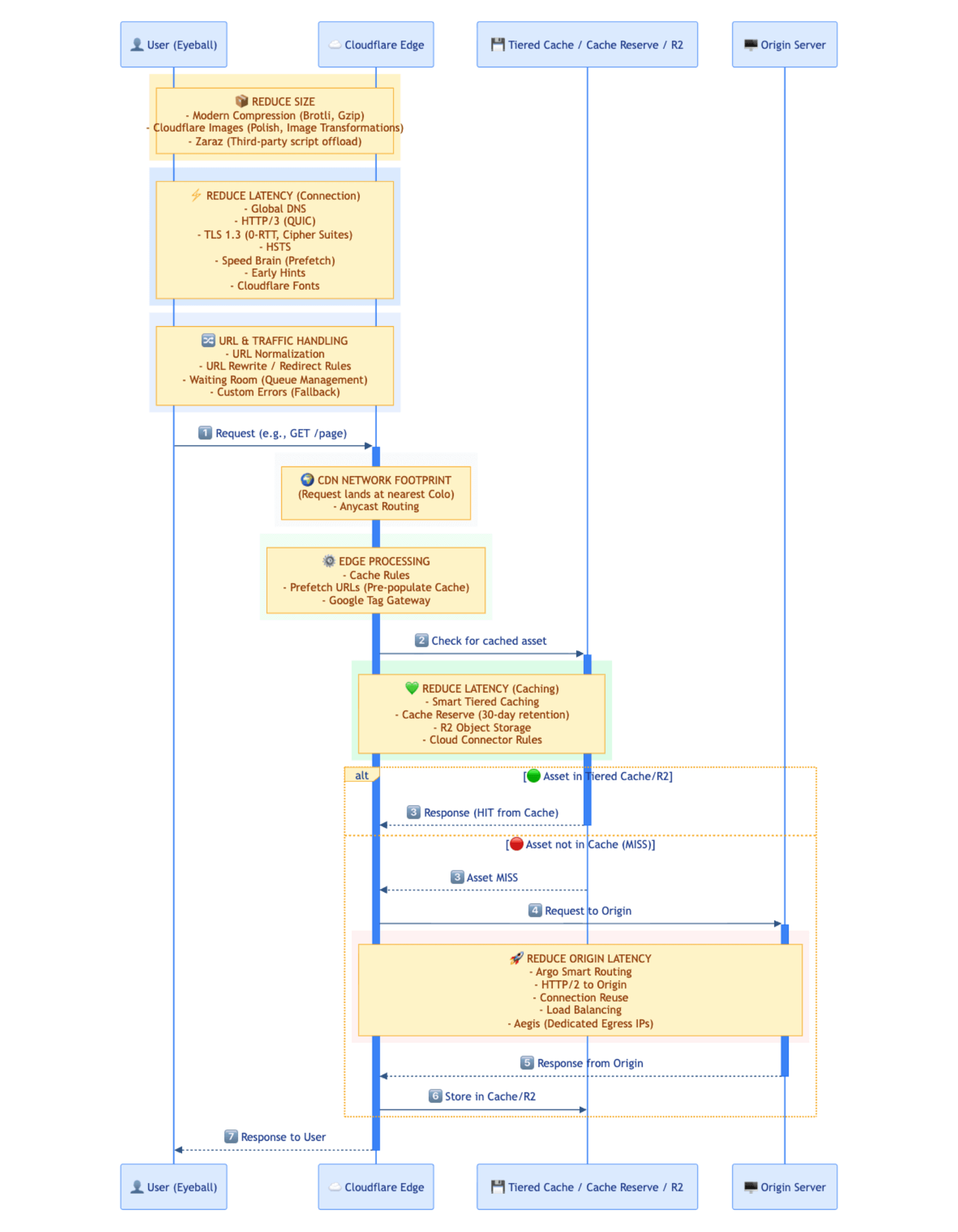
Review the network diagram visualization for Cloudflare’s Smart Shield capabilities.
Note the Phases list, highlighting the order of execution, as well as the Cloudflare API rate limits.
User (Eyeball Client)#
The user’s connection is the baseline for every performance metric. Network quality, device hardware, and geographic distance determine initial load times and responsiveness. Because device and network variability dominate perceived speed, fixing issues at this layer delivers the largest and most immediate UX improvements.
Many variables affect performance at the user connection stage: device hardware (and age), operating system (OS), CPU/RAM capacity, browser, location, Internet Service Provider (ISP), and more.
The user’s proxied request typically lands at the closest Cloudflare Point of Presence (PoP) via anycast. This is where Cloudflare’s peering and network interconnects is relevant.
Some of the Cloudflare-related features that could potentially improve some of the relevant metrics are:
| Feature | Primary Metrics Improved | Description |
|---|---|---|
| Global DNS | TTFB, LCP | By using Cloudflare’s managed DNS, the assigned anycast IP addresses are announced worldwide, likely physically close to the user too. Review third-party DNS performance on dnsperf.com. |
| IPv6 | TTFB | By default, IPv6 compatibility is turned on for your domain and will apply to all domains and subdomains covered by proxied DNS records. |
| HTTP/3 (QUIC) | TTFB, LCP | HTTP/3 (with QUIC) creates faster, more reliable connections, especially for mobile/unreliable networks. |
| 0-RTT Connection Resumption | TTFB, LCP | 0-RTT Connection Resumption reduces latency for users who have previously connected to the website. |
| TLS 1.3 | TTFB, Security | TLS 1.3 improves performance and security, including Post-Quantum Cryptography (PQC) support |
| HTTP Strict Transport Security (HSTS) | TTFB, LCP | HSTS improves performance by implementing a browser-redirect, instead of a server-redirect. |
| URL Normalization | LCP, Security | URL normalization modifies the URLs of incoming requests so that they conform to a consistent formatting standard; normalizing inbound traffic. |
| URL Rewrite Rules | LCP | Manipulate the URL of a request through different operations, like URL Rewrite Rules or Redirect Rules. |
| Compression Rules | LCP, TTLB | Configure and overwrite default compression behavior via Compression Rules for assets to reduce page load times by minimizing the size of text-based content like HTML, CSS, and JavaScript and others. |
| Image Optimization | LCP, TTLB, CLS | Use Polish or (recommended) Image Transformations for optimization of images (resize, draw overlays and watermarks, implement lazy loading, make responsive images with srcset, using parameters like width=auto and format=auto among others, etc.) to ensure faster loading with potential full customization.For CLS optimization: provide explicit width and height attributes for all <img> and <video> elements. The browser will calculate an aspect-ratio and reserve space before media loads. Use CSS min-height to reserve space for dynamic content (ads, embeds). |
| Speed Brain (Prefetching) | LCP, TTFB | Implement Speed Brain (Speculation Rules API) for proactive browser fetching of frequently requested resources (that are cached on the Cloudflare Edge) to enhance key metrics like LCP, TTFB and overall page load time. |
| Early Hints | LCP, TTFB | Early Hints takes advantage of “server think time” to asynchronously send instructions to the browser to begin loading resources (render the page) while the origin server is compiling the full response. This hinting, when the response contains link headers with preconnect or preload rel types, speeds up page load times and generally reduces user-perceived latency.Use preload with surgical precision – only for resources not in HTML like fonts, dynamic LCP images, or JS imports. For images in HTML, combine preload with fetchpriority="high". Use preconnect for 1-2 critical third-party domains; use dns-prefetch for less critical domains. |
| Zaraz | INP, Security | Use Zaraz to offload third-party tools and services, such as Google Analytics 4 or Mixpanel, to the cloud and improve the speed – specifically Total Blocking Time, impacting INP –, and security of your website. |
Prevent clients connecting via unencrypted/plaintext HTTP, by enforcing HTTPS connections.
Automate TLS certificate renewal with Advanced Certificate Manager (ACM) and customize Cipher Suites.
Check out this simple Image Transformation demo.
Cloudflare Edge (Anycast)#
The Cloudflare Edge is where most performance optimization happens. Serving content from nearby locations and implementing intelligent caching strategies cuts load times and reduces origin dependence. Edge capabilities shorten network paths and absorb traffic, delivering faster responses while protecting origin capacity.
| Feature | Primary Metrics Improved | Description |
|---|---|---|
| Caching | Cache Hit Ratio, TTFB, LCP, Origin Load | Define precise Cache Rules or Origin Cache Control Headers to control which resources are cached and for how long, optimizing caching and reducing the need to fetch assets from the origin server. Cloudflare automatically performs revalidation and request collapsing, ensuring that multiple simultaneous cache-miss requests for the same resource trigger only a single fetch to origin. |
| Caching Levels | Cache Hit Ratio | Caching Levels control how Cloudflare treats URL query strings. Standard (default) treats each query string as unique; this differs from other CDN providers and can be adjusted. |
| Cloudflare Fonts | LCP | Leverage Cloudflare Fonts to reduce the time spent on DNS lookups and TLS connections, improving LCP, by replacing Google Fonts links with inline CSS to load directly from the same website domain. |
| Google Tag Gateway for Advertisers | LCP, INP | Deploy Google scripts using your own domain with Google tag gateway for advertisers, enhancing data privacy and improving signal measurement recovery and ad measurement. |
| Waiting Room | Availability, UX (preventing overload) | By using Waiting Room, also relevant for preparing for surges or spikes in web traffic. |
| Argo Smart Routing | TTFB | Enable Argo Smart Routing to route requests over the fastest and most reliable paths (between the first Cloudflare PoP and the closest Cloudflare PoP to your origin server), minimizing latency (reducing TTFB) and ensuring faster connections. This is mainly beneficial for dynamic requests such as API requests. |
| Prefetch URLs | Cache Hit Ratio, TTFB, LCP | Pre-populate the Cloudflare Edge Cache with Prefetch URLs to increase the Cache Hit Ratio and reduce latency to critical resources (which can be cached by default), by including a link HTTP response header pointing to a manifest file with the rel="prefetch" attribute and then serve the manifest file with text/plain as the content-type response header. |
| Custom Errors | Availability, UX | Implement fallback strategies for potential origin server or Cloudflare product errors by leveraging Custom Errors. This allows serving custom assets or maintenance pages to users, providing a consistent brand experience. |
Note the default cache behavior and cacheable size limits. Programmatic customization is possible via Snippets and Workers.
For mainland China CDN, consider China Network, when all requirements are met.
Cloudflare Edge (Tiered Cache / Storage)#
Advanced caching topologies and persistent edge storage create hierarchical cache layers and long-term content availability, cutting origin calls and raising global delivery efficiency. Tiered caching and edge storage handle infrequent requests at the edge, lowering load and cost. These same patterns allow fully serverless, originless architectures where logic and data reside entirely at the edge, eliminating the origin from the critical path and reducing latency to the minimum possible path.
| Feature | Primary Metrics Improved | Description |
|---|---|---|
| Tiered Caching | Cache Hit Ratio, TTFB, LCP, Origin Load | Leverage a Tiered Caching Topology to ensure that assets are served from a hierarchy of Cloudflare PoPs, increasing Cache Hit Ratio, reducing latency, potentially saving bandwidth and load on the origin server, and improving response times for users (since optimally there’s no additional network hop to the origin). Smart Tiered Caching is normally the recommended option. |
| Cache Reserve | Cache Hit Ratio, TTFB, Origin Load | Since Cloudflare’s CDN is based on the algorithm Least Recently Used (LRU), enable Cache Reserve to serve less-frequently requested content from Cloudflare’s global storage, due to a retention period of 30 days, ensuring better content availability, increased Cache Hit Ratio, and reduced origin server load. It is recommended to use Cache Reserve in combination with Tiered Caching, as part of a wider caching topology. |
| Connection Reuse | TTFB, Origin Load | Taking advantage of HTTP/2, requests from Cloudflare can use the same connection – connection reuse – even if they are for different domains, reducing the number of connections – TCP and TLS handshakes – improving overall performance and reducing the load to the origin server. |
| Cloud Connector Rules | TTFB, Origin Load (routing efficiency) | Simplify cloud routing and object storage configurations by routing matching incoming traffic from your website to a public cloud provider that you define with Cloud Connector Rules. |
| Data or Storage Options | TTFB, LCP, Origin Load, Cost | Store assets or data in different data or storage options, such as Cloudflare R2, a distributed object storage solution, offering faster retrieval and potential cost savings. Depending on your use case, different options are available. |
Origin Server#
While edge optimization handles most traffic, the origin path still determines the speed of cache misses, dynamic logic, and API execution. A tuned origin connection and infrastructure keep latency steady, maintain availability, and sustain throughput for content that cannot be or was not cached. Tightening this layer lifts every downstream metric and prevents degradation under load.
There’s the alternative option of going serverless / originless by building and hosting directly on Cloudflare’s Developer Platform, such as Workers Static Assets or Frameworks. Here’s an example of fullstack applications.
| Feature | Primary Metrics Improved | Description |
|---|---|---|
| HTTP/2 to Origin | TTFB, Origin Load, TTLB | Use HTTP/2 to Origin and connection multiplexing to minimize origin server latency and reduce page load times. |
| Load Balancing | TTFB, Availability, Origin Load | Implement effective load balancing to distribute traffic evenly across multiple origin servers / endpoints, ensuring high availability and reliability. |
| Dedicated CDN egress IP addresses (Aegis) | Security, Availability | Dedicated CDN egress IP addresses (Aegis) for IP allowlisting on the origin server. This is one of several options to protect the origin server. |
An alternative to Load Balancing is Round-Robin DNS, a simpler approach that randomly distributes traffic across multiple servers based on DNS records.
Summary: Features by Target Metric#
A concise feature-to-metric map accelerates decision-making and reduces trial-and-error.
| To Improve | Key Features |
|---|---|
| ⚡ TTFB | Global DNS, HTTP/3, TLS 1.3, 0-RTT, Argo Smart Routing, Tiered Caching, Early Hints |
| 🎨 LCP | Compression, Image Optimization, Speed Brain, Early Hints, Cloudflare Fonts, Caching |
| 🖱️ INP | Zaraz (offload third-party scripts), Google Tag Gateway |
| 📐 CLS | Image Optimization (explicit dimensions), Cloudflare Fonts |
| 💾 Cache Hit Ratio | Cache Rules, Tiered Caching, Cache Reserve, Prefetch URLs |
| 🖥️ Origin Load | All caching features, Connection Reuse, Load Balancing |
Monitoring & Testing Tools#
Continuous monitoring and testing verify each optimization and expose new gaps. Measurement and logging confirm real gains, surface regressions early, and reveal edge cases long before they affect users.
For more detailed investigations within Cloudflare, review Cache Analytics, Instant Logs, GraphQL Analytics API, Log Explorer, or Logpush.
Use Custom Log Fields, in order to add additional relevant fields, such as request headers x-forwarded-for and cf-connecting-ip, as well as cookie cf_clearance. This allows logging them within Log Explorer and Instant Logs.
In the GraphQL Analytics API dataset
httpRequestsAdaptiveGroups, look for relevant fields, such asedgeTimeToFirstByteMs,edgeDnsResponseTimeMs,originResponseDurationMs.
In Log Explorer and Logpush check for relevant HTTP request fields, such as
EdgeTimeToFirstByteMs,CacheCacheStatus,CacheTieredFill,ClientTCPRTTMs,OriginDNSResponseTimeMs,OriginResponseDurationMs, andOriginTCPHandshakeDurationMs.
- Cloudflare Observatory – Developer documentation
- Web Analytics
- Network Error Logging (NEL) – Edge Reachability
- WebPageTest
- Google Search Console
- Google PageSpeed Insights
- DebugBear Free Site Speed Tools
- Pingdom Website Speed Test
- Site Speed Report (CrUX)
- Cloud Services Observability – Cloudflare Radar
Security Matters Too!#
For application security recommendations, see: General Application Security Recommendations.
Disclaimer#
Educational purposes only.
This blog post is independently created and is not affiliated with, endorsed by, or necessarily representative of the views or opinions of any organizations or services mentioned herein.
The images used in this article primarily consist of screenshots from the Cloudflare Dashboard or other publicly available materials, such as Cloudflare webinar slides. The mermaid diagram image was generated by Artificial Intelligence (AI).
The guidelines provided in this post are intended for general educational purposes. They should be customized to fit your specific use cases and tech stack – every website is differently built. You are responsible for configuring settings according to your unique requirements, and it is important to understand their potential impact. Familiarity with Cloudflare concepts such as Phases, Proxy Status, and other relevant features is recommended.
The author of this post is not responsible for any misconfigurations, errors, or unintended consequences that may arise from implementing the guidelines or recommendations discussed herein. You assume full responsibility for any actions taken based on this content and for ensuring that configurations are appropriate for your specific environment.
For additional learning resources, explore the following:
- Learning Paths
- Enterprise Customer Portal (for Enterprise customers)